AlternaDrive
For parents and guardians
- Book school and activity rides
- See your driver before pickup
- Follow the van and get alerts
Coming soon to theApp StoreComing soon toGoogle Play
For families
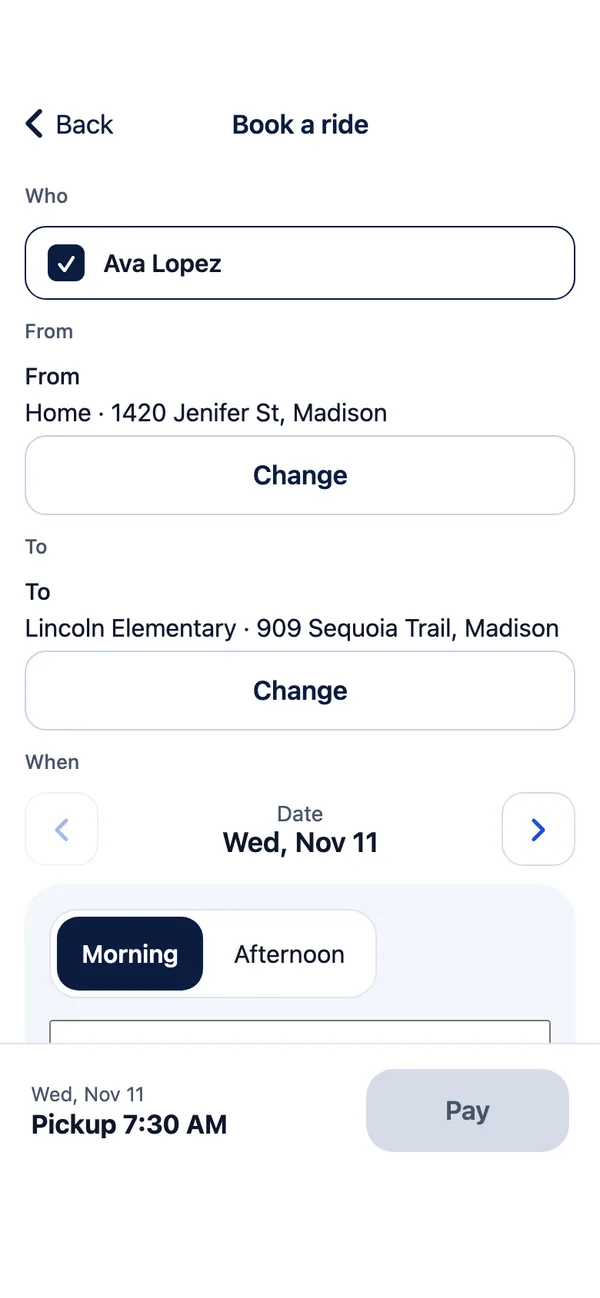
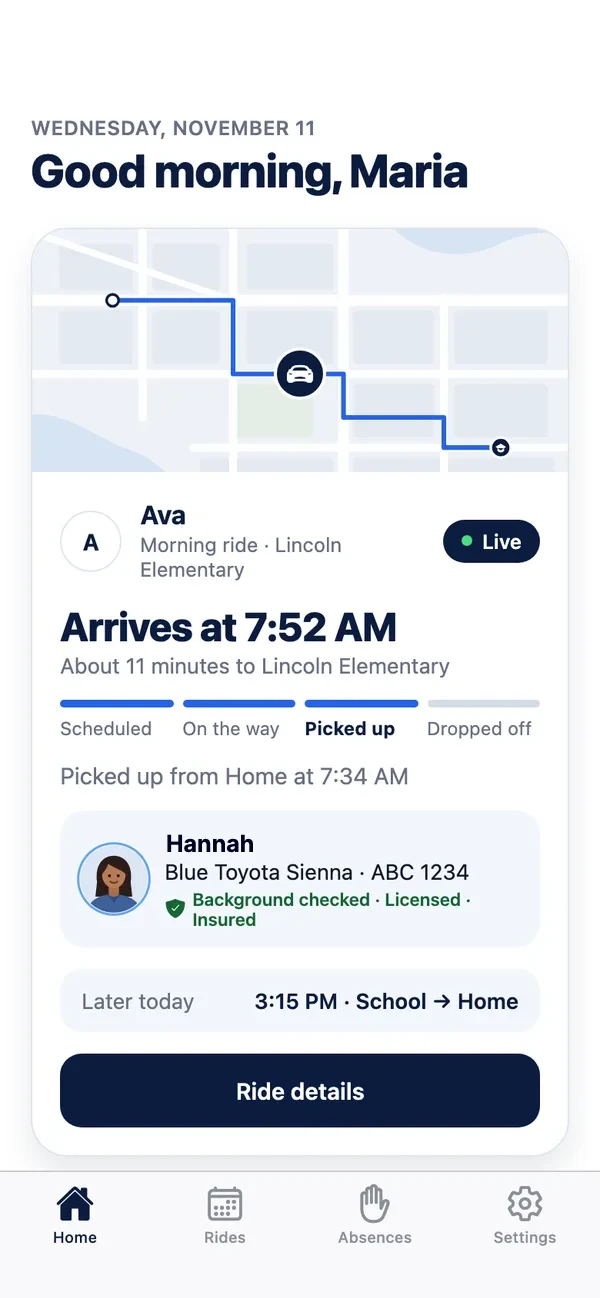
Book rides to school, activities and appointments in the AlternaDrive app. You see who is driving, follow the van on a map, and get an alert at each step.
Booking
Everything happens in the AlternaDrive app. Here is what to expect the first time.
The account holder is the child's parent or legal guardian, 18 or older. You confirm your email before you start.
Name, grade, school, seat, wheelchair, notes for the driver and an emergency contact. Every booking uses these details, so you type them only once.
Pick the pickup and drop-off addresses and a pickup time between 6:00 AM and 8:00 PM Central Time. Book at least 3 hours before pickup, up to 90 days ahead. For school, choose “Repeat every weekday” once.
The app shows the price before you pay. Your booking is made when your payment goes through. The first booking of a new family is checked by AlternaDrive once, usually the same day.
AlternaDrive offers the ride to our checked drivers. You get an alert when one accepts: “A driver has been found”.

A school week
For school, choose “Repeat every weekday” when you book. Each morning and afternoon ride then shows on the app's Home screen, with its time and its driver once one has accepted.
What you see
While the ride is under way, the app shows the driver's first name and photo, the van's color, make and plate, and the van on a live map, updated about every 5 seconds, with an arrival time.
You can turn most alerts off in Settings. Your phone must allow notifications.
Example driver

Rides we drive
Up to 3 of your children can share one ride. Each extra child can have their own pickup, their own drop-off, or both. The app puts all pickups first, then all drop-offs, and shows every stop and time before you pay. It is still one ride with one price. Only your own children ride together.
Morning drop-off and afternoon pickup, once or every school day.
Practice, lessons, tutoring and clubs, and the ride home afterwards.
Add a wheelchair, car seat or booster seat to your child's details and each booking fills it in.
Rides to therapy, doctor and dentist visits, including during the school day.
Up to 3 of your children on one ride, each with their own pickup or drop-off.
What you get
So there are no surprises on the first morning.
Prices
We don't list prices here because each ride depends on its distance. The app always shows the price before you pay.
A base price that includes some miles, then a price for each extra mile. The miles are the driving distance between your addresses.
May be added for each extra child, a wheelchair, a car seat or a booster seat. A booking keeps the price it was made at.
A one-time ride is charged when you book. A repeat booking is charged one week at a time: the first week when you book, then every Thursday at 6:00 PM for the next Monday to Friday.
You pay by card or Apple Pay, through Stripe. AlternaDrive never sees your full card number.
Seats
Put the seat your child needs in their details, and each booking fills it in. You provide the car seat or booster seat that fits your child, unless your booking shows that AlternaDrive provides it.
A seat can add to the price. Any seat charge is in the price the app shows before you pay. Please check the seat before the ride starts. The driver helps to secure it.
Cancelling
The rules from the AlternaDrive family terms, in short.
You can cancel a ride in the app until the driver sets off. Refunds go back to the card you paid with, usually within 5 to 10 business days. The driver waits 5 minutes for a morning ride and 10 minutes for an afternoon or evening ride.
The full rules are in the AlternaDrive family terms.
Your account
At home, the driver hands your child only to you or to an adult you added under “Adults who may receive”. The driver may ask for photo ID.
Seen by you, AlternaDrive staff, and only the driver of that ride, from the moment they accept until the ride ends. AlternaDrive never asks for your own location.
Ask AlternaDrive in the app to link your child. You don't pay for those rides; you can follow them and mark your child absent.
Any time, in Settings → Delete my account. Your details, your children's details, places and card details are removed.
Read the AlternaDrive privacy notice and how we keep rides safe.
Get started
Booking is in the AlternaDrive app. If you have a question before you start, send it here and a person at AlternaDrive answers.
For parents and guardians
More answers on AlternaDrive support and in our questions and answers.
Tell us a little about the rides you need. We answer by email or phone. To book, use the AlternaDrive app.
Fields marked with a star are required.
Contact
Questions about a ride, a school contract or driving with AlternaDrive. Call, email or send us a message.
Serving Wisconsin, Illinois, California and Texas.